How to Create a Logo Using AI: Step-by-Step Guide
Every business needs a logo as part of its branding. It gives customers a visual way to recognize the business and can appear across websites, social media profiles, packaging, signage, business cards, and other brand materials.
Creating one, however, can feel difficult if you do not have design experience. Traditionally, businesses either had to create a logo from scratch using design software or hire a professional designer.
AI logo makers provide another option. They can generate logo ideas quickly and give you a starting point that you can customize rather than requiring you to design everything from a blank canvas.
If you want to learn how to create a logo using AI, this guide covers what to consider before you begin, how AI logo creation works, and the steps involved in turning an initial logo idea into a finished design.
How Does AI Logo Creation Work?
AI logo makers simplify the early stages of logo creation by generating design options based on information you provide.
The exact process varies between tools. Some ask you to describe the type of logo you want in a text prompt, while others may ask for your business name, industry, preferred style, colors, or other details.
Once that information is provided, the tool generates logo concepts for you to review. You can then choose a design that fits your business and customize elements such as the text, colors, fonts, layout, or graphics, depending on the features available.
This means AI does not necessarily make every design decision for you. Instead, it can help speed up the process by giving you possible directions to work from.
For someone who does not know where to begin, this can be much easier than staring at an empty canvas and trying to develop a complete logo concept from scratch.
What to Consider Before Creating Your Logo
You do not need a complete branding strategy before using an AI logo maker, but having some basic direction can make it easier to evaluate the designs you receive.
Consider:
Your brand name: Make sure you know exactly how you want the business name written and capitalized.
What your business does: A logo should make sense in the context of your product, service, or industry.
Your target audience: Think about the type of people you want the brand to appeal to.
Your brand personality: Should the business feel modern, professional, playful, elegant, bold, traditional, or something else?
Your general visual preferences: Having an idea of the colors or styles you like can make narrowing down options easier.
You do not need to settle every branding decision before you start. These are simply useful reference points for deciding whether a generated logo feels right for the business.
What Makes a Good Logo?
A good logo should help people recognize a business without becoming unnecessarily complicated.
When comparing logo ideas, look for a few basic qualities:
Simple: The design should be easy to understand without too many competing elements.
Relevant: The overall look should fit the business and its brand personality.
Readable: Any text in the logo should remain easy to recognize.
Versatile: The logo should work across different applications and sizes.
Keeping these principles in mind can help you evaluate AI-generated designs more objectively instead of choosing an option based only on first impressions.
Common Logo Types and Styles
Knowing some of the most common logo types can also help you identify the kind of design that might work for your business.
Wordmark
What it uses: The brand name as the primary design
Good for: Businesses with distinctive names
Symbol
What it uses: A standalone icon or graphic
Good for: Brands that want a recognizable visual mark
Combination mark
What it uses: A brand name combined with a symbol
Good for: Businesses that want both a name and recognizable imagery
Emblem
What it uses: Text placed within a badge, seal, or shape
Good for: Traditional or badge-style brands
Logos can also follow different visual styles, including minimalist, modern, playful, elegant, vintage, or bold.
If you are unsure which direction to take, browsing different logo ideas can help you identify styles that fit the image you want your business to present.
Can You Create a Good Logo With AI Without Design Experience?
Yes. You do not need to be a graphic designer to use an AI logo maker.
One of the main advantages of AI logo creation is that you can begin with generated concepts instead of designing every component yourself. You can compare different ideas, choose the one that best represents the business, and make adjustments through an editor.
This can make AI logo makers particularly useful for:
Small business owners
Freelancers
Creators
Startups
Side projects
Businesses with limited design budgets
You will still need to make decisions about which logo fits your brand, whether the text is readable, and how the overall design looks. But those decisions are generally much more approachable than building a logo from scratch.
AI logo makers are not a replacement for every professional design project. Businesses that need a complete visual identity system, extensive brand strategy, or highly customized artwork may still benefit from working with a designer.
For businesses that simply need a professional-looking logo without a complicated design process, however, AI can provide a faster and more accessible starting point.
How to Create a Logo Using AI in 5 Steps
Now that you know what to look for, here is how to create a logo with AI using One Dollar Logo Maker.
For this walkthrough, we will create a logo for a fictional business called Bloom Bakery and follow the process from entering the brand name to preparing the finished design for download.
Step 1: Enter Your Brand Name
Go to One Dollar Logo Maker and enter your business or brand name into the logo generator.
For this example, we entered Bloom Bakery. Then click Generate Logo.
With this workflow, there is no need to write a detailed prompt describing the logo you want. You can begin with the brand name and explore the available designs from there.
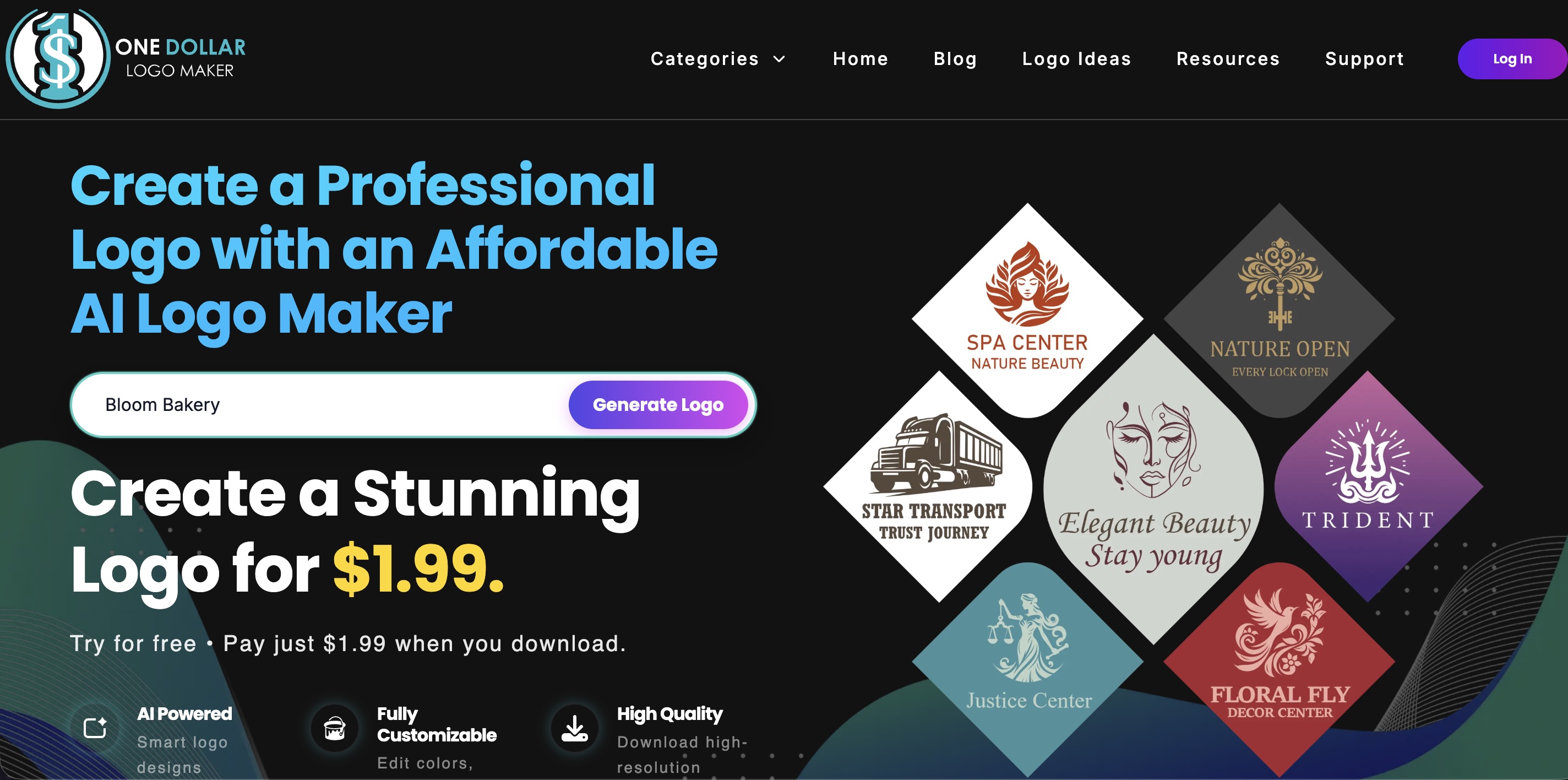
Enter your brand name and click Generate Logo to get started.
Step 2: Browse the Generated Logo Ideas
After generating your logo, you will see a selection of designs to browse.
You do not need to find a completely finished design at this stage. Instead, look for an option that provides a strong starting point for the brand.
Consider:
Does the imagery fit the business?
Does the design match the personality you want the brand to have?
Is the logo easy to understand?
Could you imagine using it across your website, social media, packaging, or other materials?
For Bloom Bakery, the generated results included a variety of bakery-related concepts featuring elements such as cakes, wheat, baking tools, and floral graphics.
We selected the Floral Baking Logo, which features a rolling pin surrounded by flowers. The rolling pin clearly connects the design to baking, while the floral illustration complements the Bloom Bakery name.
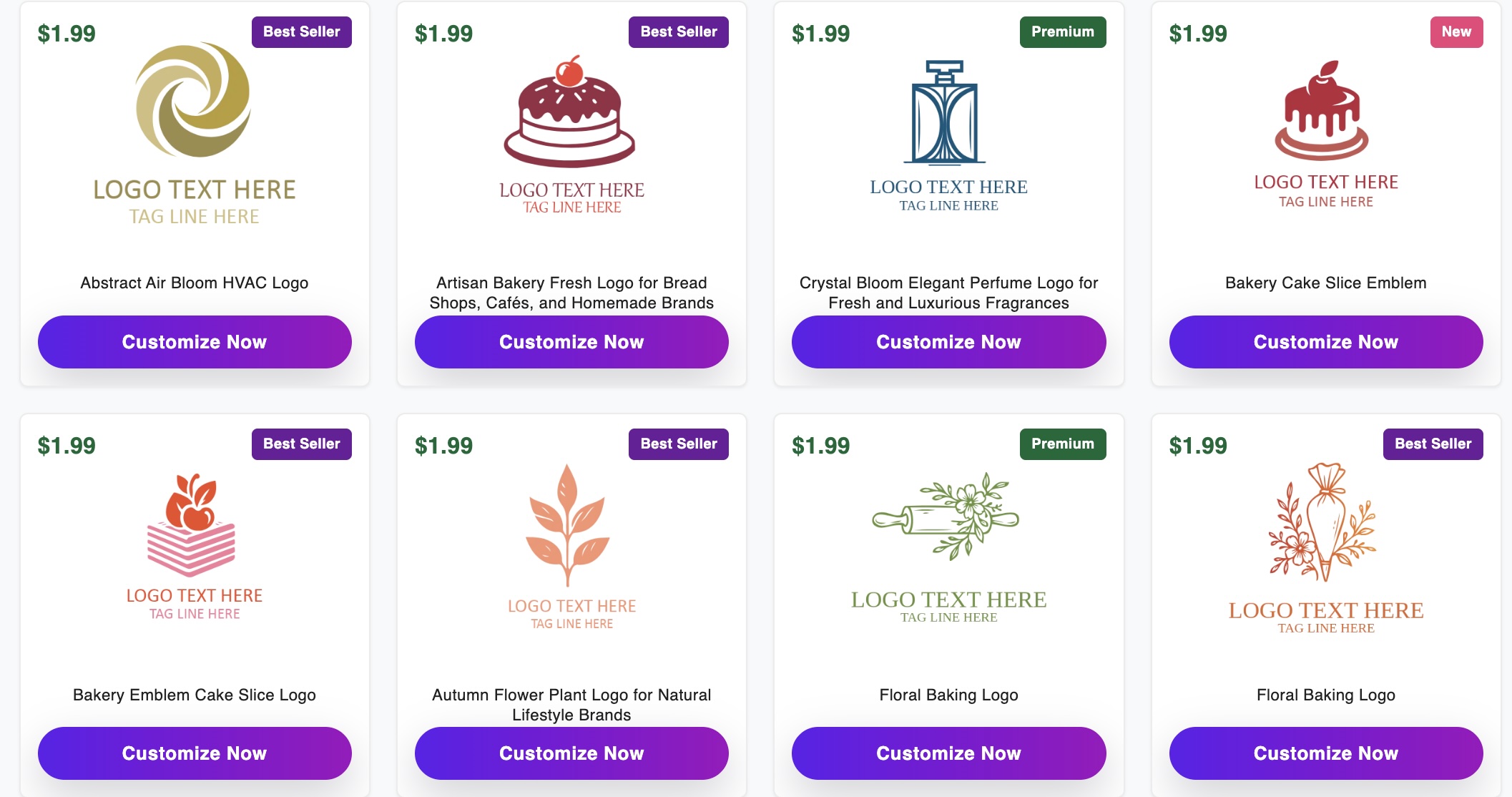
Browse the generated logo options and choose a design that fits your business.
Once you find a design you want to use, click Customize Now.
Step 3: Customize Your Logo
The selected design will open in the logo editor, where you can personalize it for your business.
One Dollar Logo Maker provides customization controls for elements such as:
Logo text
Font family
Font size
Text alignment
Colors
Layout
Background
Logo elements
Shapes
Layers
Positioning
Flip and duplicate controls
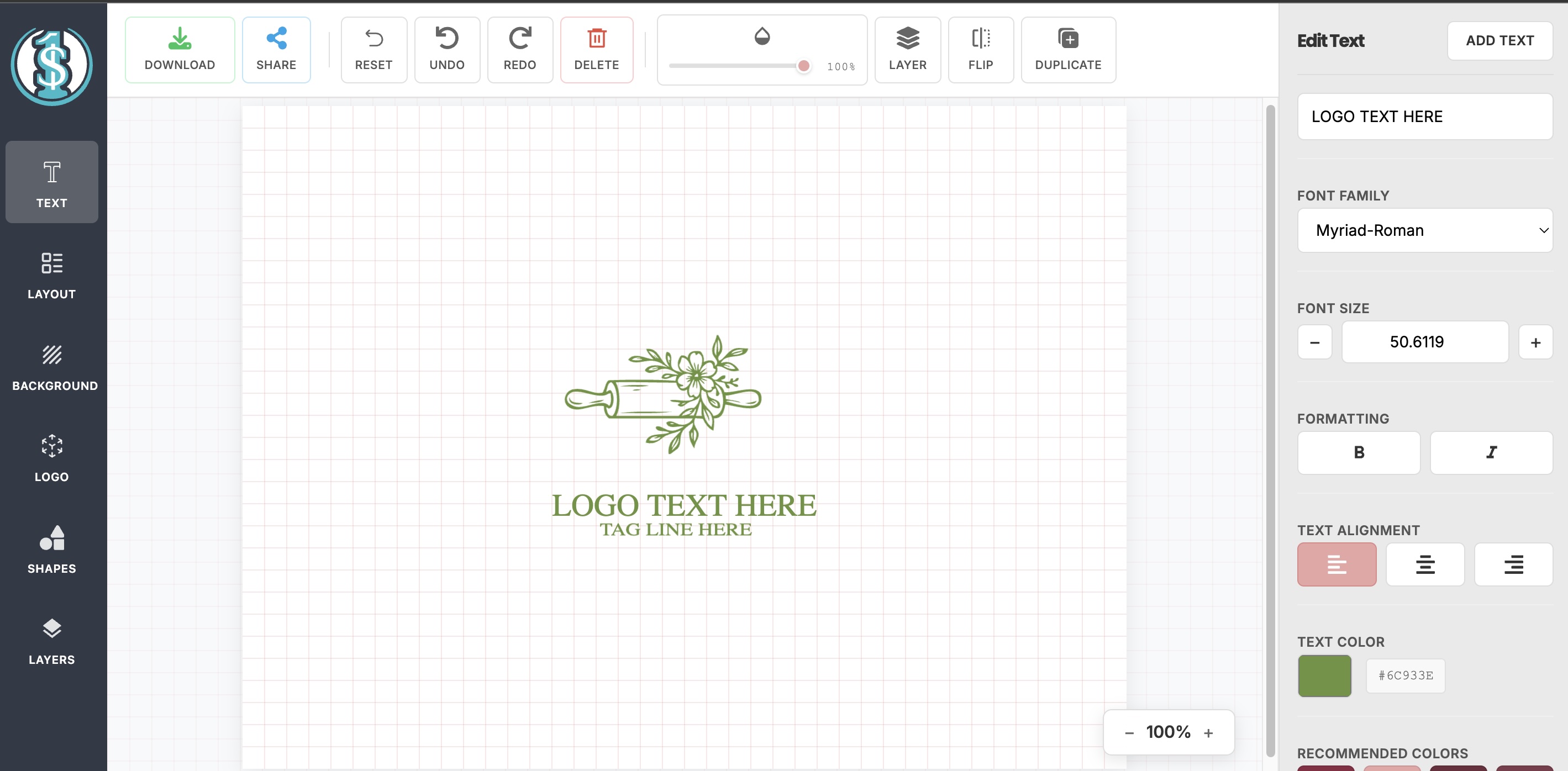
Use the editor to personalize the text, colors, layout, and other elements of your logo.
Use these options to refine the generated design until the logo feels appropriate for your business.
There is no requirement to change every available setting. If part of the original design already works well, you can leave it as it is and focus only on the elements that need adjustment.
The goal is to create a logo that feels clear, cohesive, and suitable for the way you plan to use it.
Step 4: Review Your Final Logo
Once you are happy with the design, review the entire logo before moving on to the download stage.
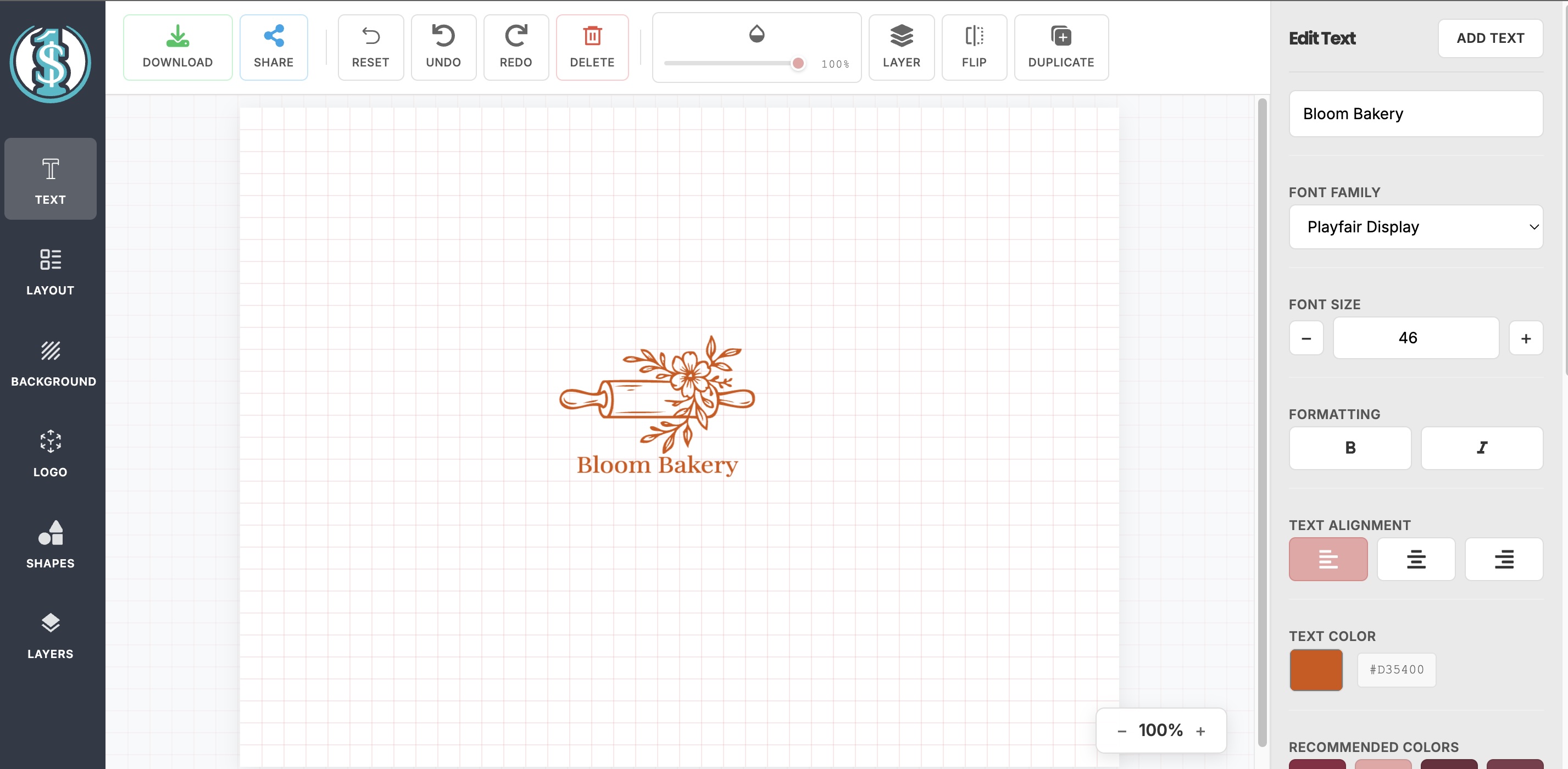
Review the finished logo before preparing it for download.
Check a few important details:
Is the business name spelled correctly?
Is the text easy to read?
Does the logo look balanced?
Is the main symbol clear?
Does it still look good when viewed at a smaller size?
Does the overall design fit the business?
It is also worth thinking about where the logo will eventually appear.
A design that looks good at a large size in the editor should also remain recognizable when used in a website header, social media profile, business card, product label, or other smaller application.
Once everything looks right, you can move on to downloading the files.
Step 5: Choose a File Format and Download Your Logo
Click Download when your logo is ready.
One Dollar Logo Maker currently offers several file options:
PNG
JPEG
SVG
PDF
Download All (ZIP)
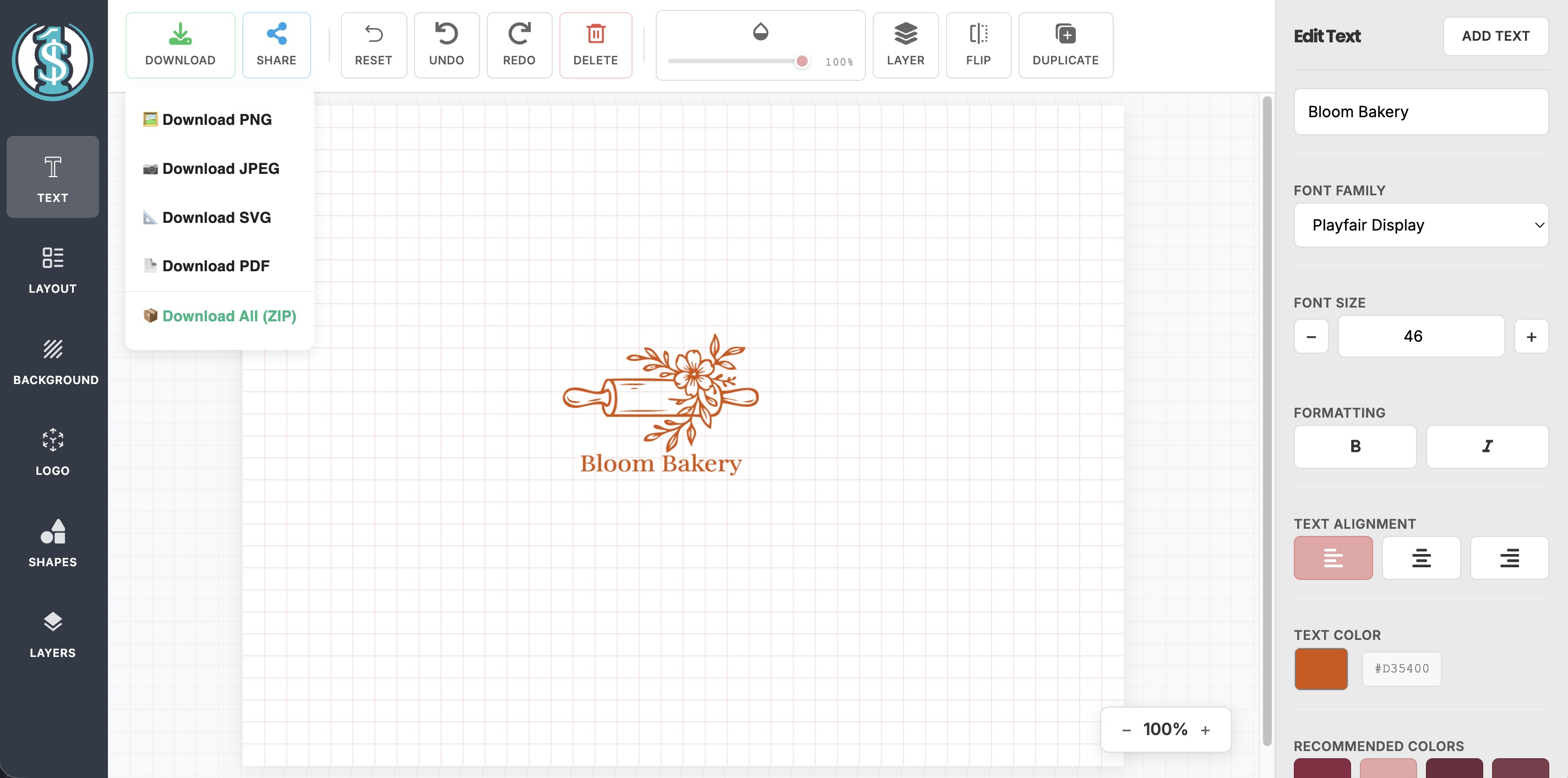
Select the logo file format that fits how you plan to use the design.
The best format depends on what you plan to do with your logo.
PNG is a useful choice for websites, social media, and other general digital applications.
JPEG works for standard digital images when transparency is not needed.
SVG is a vector format, making it useful when the logo needs to be resized without losing quality.
PDF can be convenient for sharing a logo or using it in certain print workflows.
You can also select Download All (ZIP) to get the available formats together.
One Dollar Logo Maker lets you generate and customize your design for free. The current price is $1.99 when you choose to download your finished logo.
If you are not already signed in, you will be prompted to log in or create an account as part of the download process.
You can also log in earlier in the logo creation process if you prefer.
Tips for Getting Better Results From an AI Logo Maker
An AI logo maker gives you a head start, but the quality of the finished result still depends on the choices you make along the way.
Compare Several Designs Before Choosing One
Take some time to browse different options before deciding which logo to customize.
Pay attention to the overall concept rather than individual details that can be adjusted later. Starting with a design that already fits the brand will usually make customization easier.
Keep the Design Simple
Avoid adding elements just because they are available.
Too much text, too many graphics, or an overly complicated layout can make a logo harder to recognize, particularly when it is displayed at a small size.
Focus on the elements that communicate the brand most clearly.
Choose a Font That Fits Your Brand
Typography can significantly change the personality of a logo.
Serif fonts can create a more established, traditional, or elegant appearance, while sans-serif fonts often feel cleaner and more modern. Decorative and script fonts can add personality but should still remain readable.
Choose typography based on the image you want the brand to present rather than simply selecting the most decorative option.
Choose Colors Intentionally
Color can also change the overall impression of a logo.
Think about the personality of the business and how you want customers to perceive it. Compare a few options in the complete design rather than judging individual colors in isolation.
You do not need a complicated color palette. A simple, consistent approach is often easier to apply across different brand materials.
Create Your Own Logo With One Dollar Logo Maker
Learning how to make a logo with AI does not require professional design software or complicated prompting.
With One Dollar Logo Maker, you can enter your brand name, browse generated logo concepts, choose a design, and customize it using the built-in editor.
You can generate and customize your design without paying upfront. When you are satisfied with the finished logo, you can download it for $1.99.
Enter your brand name and start creating your logo with One Dollar Logo Maker.
Frequently Asked Questions About Creating a Logo With AI
Can AI create a logo from a business name?
Yes. Some AI logo makers can use a business or brand name as the starting point for generating logo ideas.
With One Dollar Logo Maker, you enter your brand name and then browse the available logo designs before choosing one to customize.
Do I need to write an AI prompt to create a logo?
Not necessarily.
Some AI design tools rely on detailed text prompts, while other logo makers use simpler inputs such as your brand name, industry, or design preferences.
One Dollar Logo Maker starts with your brand name, so you do not need to write a detailed prompt before generating designs.
Can I make a logo with AI for free?
It depends on the tool and what you mean by free.
With One Dollar Logo Maker, you can generate logo ideas and customize your chosen design without paying upfront. The current $1.99 charge applies when you download the finished logo.
Can I customize an AI-generated logo?
Yes. AI-generated logos can usually be customized after you select a design.
One Dollar Logo Maker includes controls for elements such as text, fonts, sizes, colors, layouts, backgrounds, logo elements, shapes, positioning, and layers.
What file format should I use for my logo?
The right format depends on where you plan to use the logo.
PNG is suitable for many digital applications, while JPEG works for standard images that do not require transparency. SVG is useful when you need to scale the logo while maintaining image quality, and PDF can be useful for sharing or certain print applications.
One Dollar Logo Maker also offers a ZIP option for downloading the available formats together.